
Linking and commands
This page shows how the player links their store account to their server character, which commands the plugin has and who can use each one.
Link the account to the game
Linking proves the store account and the server player are the same person. That is what
lets a player redeem gifts in game and buy with balance through /loja. It needs plugin
2.8.0 or newer.
-
On the store, the player opens Profile > Game and clicks Generate code.
-
On the server, they join with the same nick as the account and type the command with the code:
In the game chat /vincular K7QM2P -
Done. In Profile > Game, they see since when they are linked and can Unlink.
Once linked, the player redeems gifts with /resgatar <code>. See
Gifts.
The commands
| Command | What it does | Permission |
|---|---|---|
/vip |
The player's VIP menu | hystore.vip |
/vip upgrade |
Shows which VIP they can move up to and how much it costs | hystore.vip.upgrade |
/tempovip [player] |
VIP time left. Seeing someone else's needs hystore.vip.tempo.outros |
hystore.vip |
/loja |
The in-game store | hystore.loja |
/vincular <code> |
Links the store account to the player | hystore.vincular |
/resgatar <code> or /usarkey |
Redeems a gift | hystore.resgatar |
/vip admin <player> |
A player's VIP panel (Minecraft) | hystore.admin.vip |
/darvip <player> <vip> <days> |
Gives a VIP | hystore.admin.vip |
/removervip <player> <vip> |
Removes a VIP | hystore.admin.vip |
/congelarvip <player> <vip> |
Freezes a VIP | hystore.admin.vip |
/hystorereload |
Reloads the plugin | hystore.reload |
/hystore aviso |
Used by the store, console only |
Who can use them: permissions
Commands are used inside the game, so your server's permissions plugin decides, like LuckPerms, and not the dashboard roles.
| Permission | Who has it by default |
|---|---|
hystore.vip, hystore.vip.upgrade, hystore.loja, hystore.vincular, hystore.resgatar |
Everyone |
hystore.vip.tempo.outros, hystore.admin.vip, hystore.notify, hystore.notify.tickets, hystore.reload |
OP only |
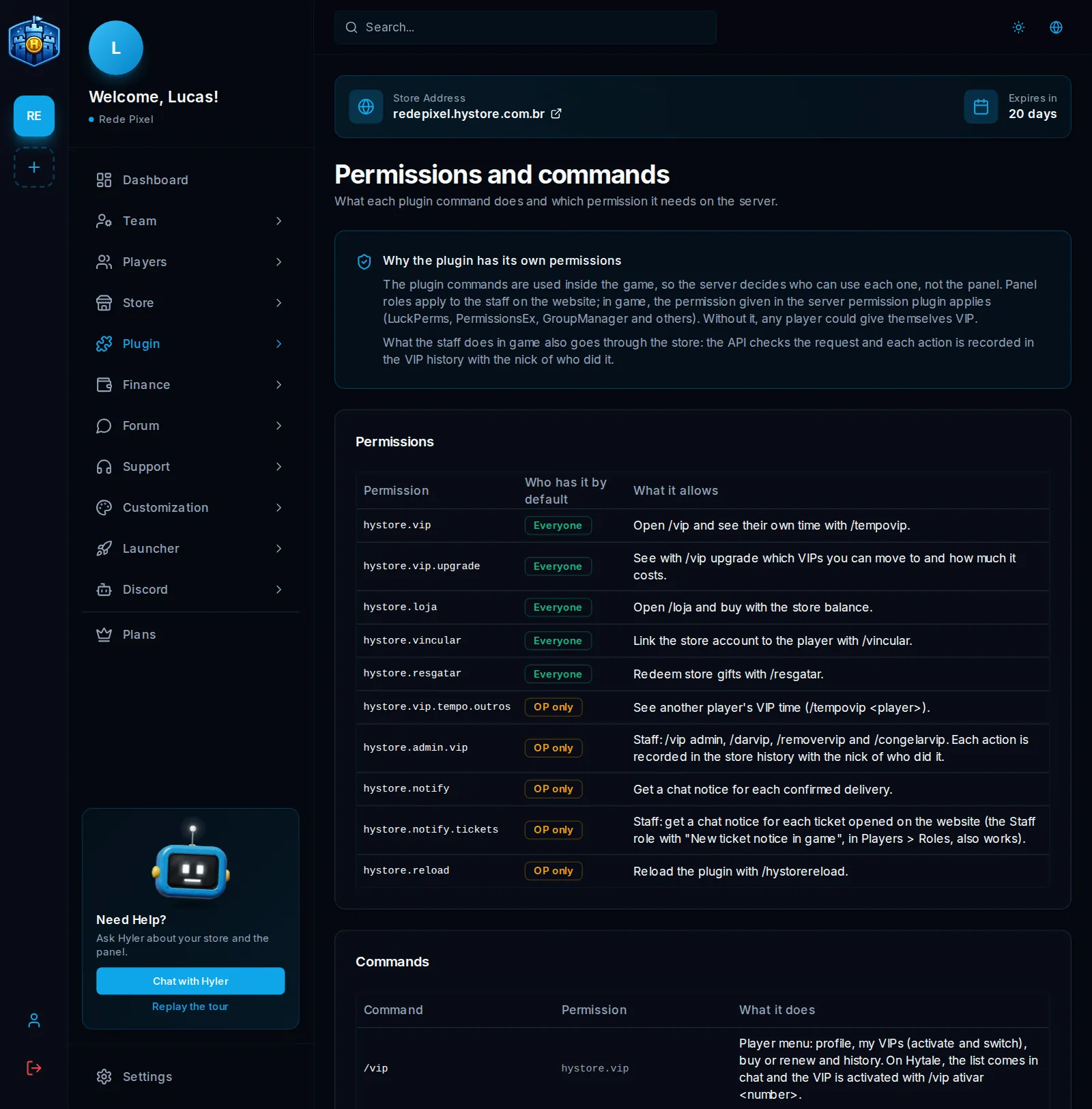
To give your team the VIP commands with LuckPerms:
lp group moderator permission set hystore.admin.vip true
Change moderator to the name of your team's group.
Rename a command
This is for when another plugin on the server already uses the same command, like /loja.
- In Plugin > Permissions and commands, go to Command names.
- Change the name and, if you want, add up to 3 aliases, separated by commas.
- Click Save names.
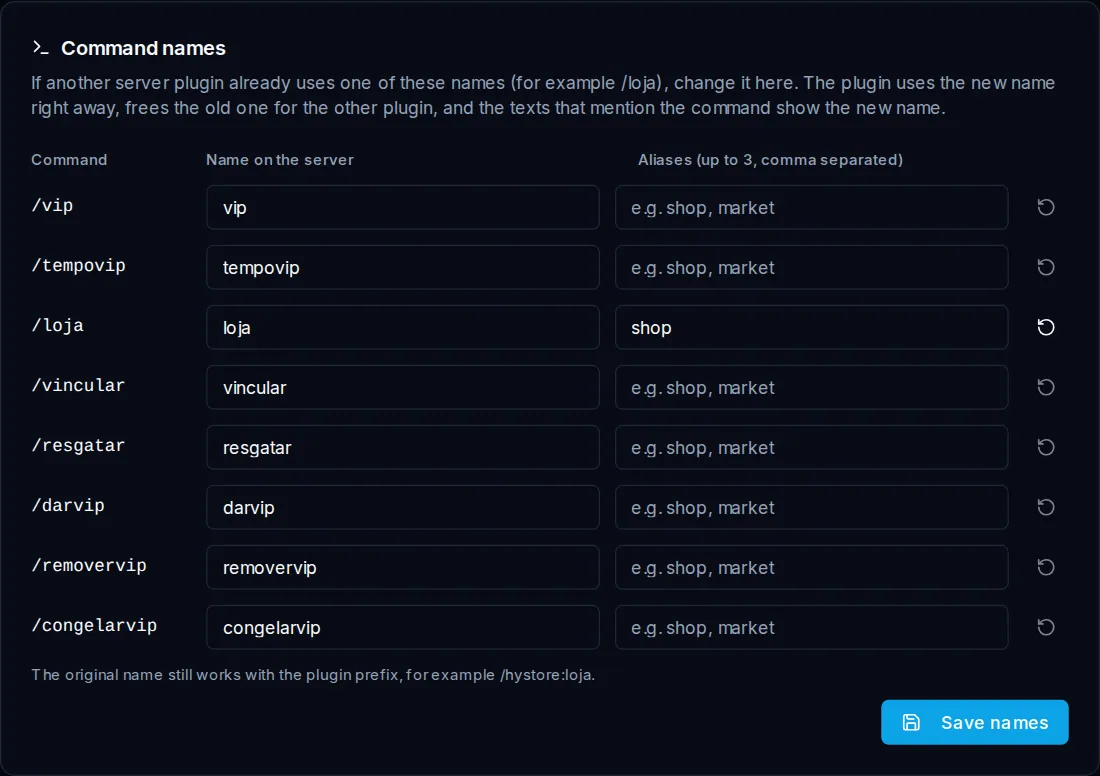
The plugin starts using the new name right away, with no restart, and frees the old name
for the other plugin. The original name keeps working with the prefix, like /hystore:loja.
The plugin and store texts that mention the command show the new name.
- Names take 2 to 20 lowercase letters, numbers,
_and-. - You cannot use server commands, like
/helpand/tp, or the same name on two commands. - If the new name already belongs to another plugin, the console warns and the command
becomes
/hystore:<name>. - The arrow next to each row goes back to the default name.
Changing it needs the Configure the plugin permission, in Access roles.
