
VIP on the product
On Hystore, the VIP is written on the product itself. With the VIP system,
the plugin takes care of everything on the server: it puts the player in the
group, counts the time, shows /vip with a menu, warns before it ends and
removes the VIP on its own at the end. There is no separate VIP screen.
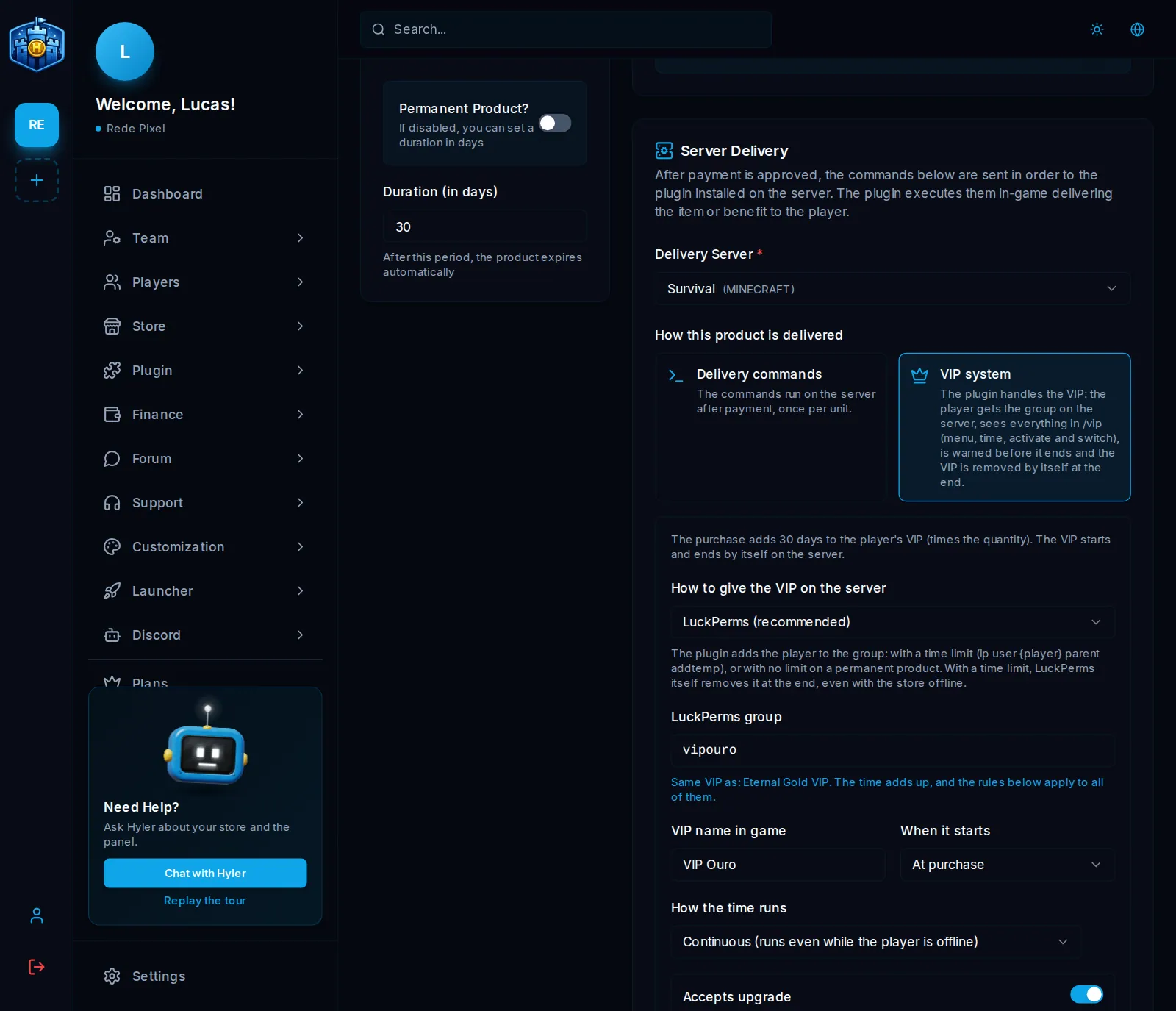
Turn on the VIP system
- In Store > Products, create or open the VIP product.
- In Product Duration, turn off Permanent Product? and enter the days (for example, 30). For a VIP that lasts forever, leave Permanent Product? on.
- In Server Delivery, pick the Delivery Server.
- In How this product is delivered, pick VIP system. Delivery commands that were already written move to the commands on activation.
- Set up the options below and save the product.
How the VIP is given on the server
| Option | When to use | What happens |
|---|---|---|
| LuckPerms (recommended) | The server uses LuckPerms | The plugin puts the player in the group you enter. With a time limit, LuckPerms itself removes it when it ends, even with the store offline |
| Custom commands | Another permission plugin | You write the commands to add and to remove, which run when the VIP starts and when it stops |
With LuckPerms, the group is the VIP: two products with the same group (for example 30 and 90 days, or 30 days and permanent) are the same VIP, and the time adds up. The dashboard shows which other product shares the VIP, and the rules apply to all of them.
The other options
- VIP name in game: the name shown in
/vip. - When it starts: At purchase, or when the player activates it in
/vip(the VIP is stored until then). - How the time runs: real time (the default: it runs even with the player offline) or only while the player is online (it counts play time only).
- Accepts upgrade: whoever has a lower-priority VIP sees this VIP in My
VIPs and in
/vip upgrade, and pays only the difference. - Commands on activation: run once, the first time the VIP applies (kit, tag, announcement).
- Commands when it ends: run once, when the VIP ends for good.
- In the advanced options: how many days ahead to warn about the end, the priority (with more than one VIP, the highest priority applies and the others wait paused, losing no time), the color and the menu item in the game.
Commands accept {player}, {vip}, {dias} (days) and {segundos} (seconds).
On a permanent VIP, {dias} is 36500.
give {player} diamond 16
broadcast &6{player} is now {vip}!
VIP upgrade
With Accepts upgrade on, a player with a smaller VIP buys the bigger one by paying the difference, through the store cart. The price comes from the products on sale for each VIP: the player pays the difference in price per day times the time left, never less than R$ 1.00. Once paid, the time that was left moves to the new VIP. Coupons do not discount an upgrade.
Buying again, refunds and the game
- Buying again adds time (the days times the quantity).
- A refund or cancellation removes the days of that purchase. When the VIP ends, the commands when it ends run and the next paused VIP applies again.
- In the game, the player uses
/vip(profile, my VIPs, activate, switch and history) and/tempovip. They also see their VIPs on their store profile, in My VIPs. - With PlaceholderAPI on the server, there are
%hystore_vip%,%hystore_vip_dias%and%hystore_vip_tempo%.
Whoever has a VIP shows in Players, on the With VIP tab, where you give, remove time, freeze and remove VIPs by hand. See Players and roles.
