
Digital products
A digital product store sells what is delivered over the internet: files (textures, maps, plugins, e-books), license keys and access. It has no game server, plugin, commands or nick: the buyer logs in with their email and gets everything in My purchases, on their profile in the store.
The two delivery types
When you create the product, the Digital delivery card asks for the type:
| Type | What the buyer gets | Stock |
|---|---|---|
| File to download | The newest file you uploaded, to download | Endless |
| License key | A key from your stock, only theirs | The number of active keys |
The type does not change after the product is created. To sell another way, create another product.
After creating, the dashboard opens the Product delivery screen. Later, on the edit product screen, the Manage delivery button takes you there.
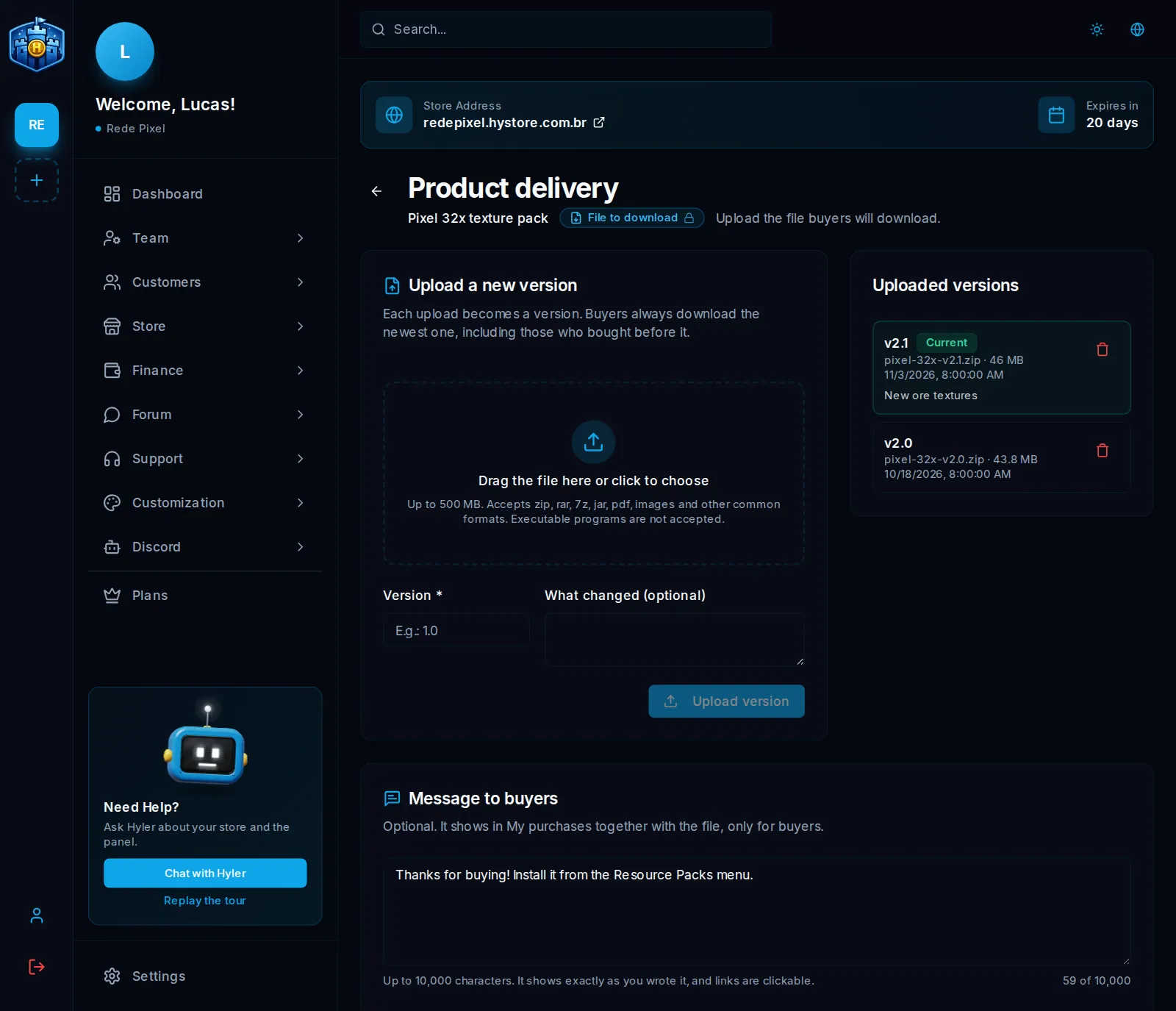
File to download
- In Upload a new version, drag the file to the dashed area or click it to choose. It accepts up to 500 MB: zip, rar, 7z, jar, pdf, images and other common formats. Executable programs are not accepted.
- Enter the Version (for example
2.1) and, if you like, what changed. - Click Upload version.
Each upload becomes a version, listed in Uploaded versions. Buyers always download the newest one, including those who bought before it. The download limit per purchase goes from 1 to 1000, or stays empty for no limit.
License key
- Paste the keys, one per line, up to 2000 per upload. Repeated keys are left out.
- Each purchase gets one active key.
Each key shows on a card with its status:
- Active: goes to the next purchase;
- Sold out: already delivered to a buyer and stays with them;
- Inactive: turned off by the store; no purchase gets it.
An active key can be turned off, and an inactive one turned back on. The list shows 9 keys per page, with a status filter and a search: up to 4 characters searches the end of the key; pasting the whole key finds exactly that one.
Message to buyers
On the same screen, the Message to buyers is an optional text of up to 10,000 characters: install steps, a link, an access. It shows in My purchases next to the file or the key, only for buyers, with clickable links.
Thanks for buying!
1. Download the file below.
2. Put the folder in .minecraft/resourcepacks.
3. Turn it on in Options > Resource Packs.
Questions? https://discord.gg/yourserver
On the order
In Store > Orders, the order of a digital product has the Digital delivery card, with each unit, the downloads used and the end of the key that was delivered. Revoke access takes that unit away from the buyer. A refund through the payment provider revokes the access on its own. See Orders.
Uploading and deleting versions, pasting and removing keys and revoking access need the Manage files and keys permission. See Team and access roles.
